Showing posts with label SEO. Show all posts

Sunday, March 27, 2016

Link Building

link building

1. Build them! – Inbound links continue to be one of the primary factors Google uses to rank web pages.
2. Links from authoritiative domains pass more power – The more trust and authority a domain has, the more beneficial a link from it is likely to be to your rankings. You can use the Domain Rating figure (DR) in Ahrefs Site Explorer to quickly assess the relative strength of a domain (high DR = high authority). Other metrics to consider include DA (Moz) and Trust Flow (Majestic).
3. Links from topically related sites assist rankings – Links from quality sites within your niche, or pages which are topically related to your content are beneficial for rankings. 
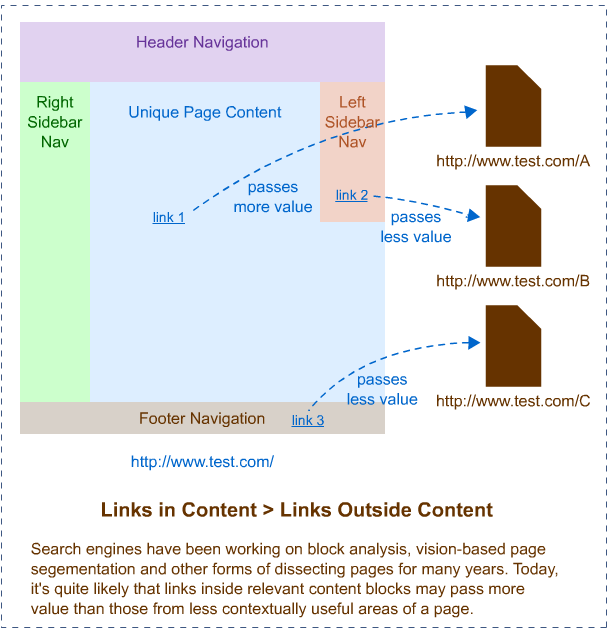
4. Links from within content are the most valuable – Editorial links from within content are considered to be the strongest links.
links from within content are most valuable
5. Steal your competitor’s links – An analysis of your competitor’s backlink profile is a great starting point for any link building campaign. Use Ahrefs Site Explorer to easily uncover your competitor’s links and go ahead and grab them for your own site.
6. Low quality link building may cause penalties – Low quality and automated link building may cause your site to be penalised by Google. 
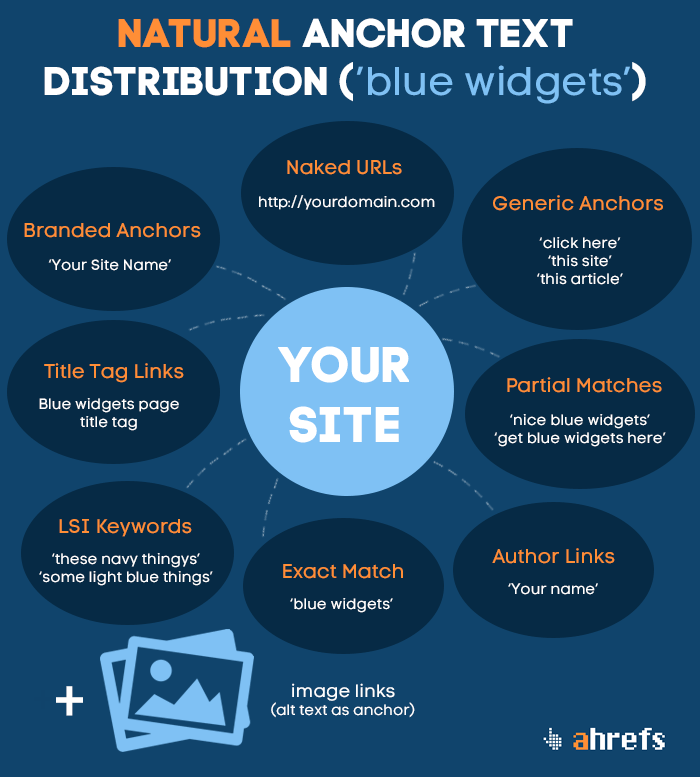
7. Diversify your link profile – A strong link profile should include several different types of link. 
8. Diversify your anchor text – Keyword usage is anchor text is still a ranking factor, however, it is important to diversify it. A mixture of branded, generic, and keyword based anchors is desirable. (further reading)
anchor text distribution infographic
9. Regularly audit your link profile – Conduct a regular audit of your link profile and look out for suspicious/unnatural looking links. While a small number should not do you any harm, large quantities of low quality links may be an indication of low quality link building by an SEO company, or even a negative SEO campaign from a competitor. If this is the case then you should consider removing or disavowing these links.

Google Tools for SEO

 Google Webmaster Tools (Search Console)

webmaster tools
1. Look for ‘quick wins’ – Use the search analytics report, ordered by impressions, to look for keywords with a high number of impressions and average search position 11+. Adding some internal links to these pages, or even just making sure that the exact phrase is included on the page, can be enough to move the keyword into the top 10 and instantly boost traffic.
2. Check for errors – Regularly check for (and fix) errors in the ‘Crawl Errors’ report.
3. Submit a site map/site maps – You may want to add a sitemap, or sitemaps to ensure all pages on your site can be found, and to set crawl priority. 

Google Analytics

google analytics
4. Sign up for Google Analytics – Accurate traffic stats are essential to monitor the effectiveness of your marketing campaigns.
5. Regularly check stats and react to any changes in traffic – Check your stats regularly to look for changes in traffic, landing pages etc and react accordingly.

SEO Tips For Content

<title>This is a title tag</title>
1. Front load your keyword – Try and include your target keyword as close to the start of the title tag as possible.
2. Avoid truncation – Title tags have 512px to play with in desktop search results, after which they will truncate. A good rule of thumb is to keep the length of your title tags to 55 characters or less, which will generally fit into this area, however, in rare cases, capitalisation and search query may still result in truncation.
3. Make it clickable – Headlines sell newspapers and page titles ‘sell’ web pages.
4. Stand out – If all the page titles in your niche follow a certain format, then doing something different can make your titles stand out in the SERPs. 
5. Don’t bother adding your brand – Including your brand name at the end of page titles is unnecessary – Google will often add it automatically anyway – and takes up valuable real estate. However:
6. Optimise home page for brand – The exception to this is your home page, where your title should generally be optimised for your brand.
7. Minimise stop words – With limited space to play with try and minimise use of stop/joining words – “a, and, is, on, of, or, the, was, with” – in page titles. 
8. Don’t repeat yourself. Don’t repeat yourself. Don’t repeat yourself. – Annoying isn’t it? Use your keyword once in the title and don’t repeat it.
<meta name="description" content="This is a meta description. It can help your content stand out in search results and improve CTR" />
9. Sell your content – Your meta description is like your advert in the search results. Write a unique, compelling meta description for each page on your site, that communicates USPs/value, and entices click-throughs.
10. Avoid truncation – Keep your meta descriptions to around 155 characters (maximum) to minimise truncation in the search results.
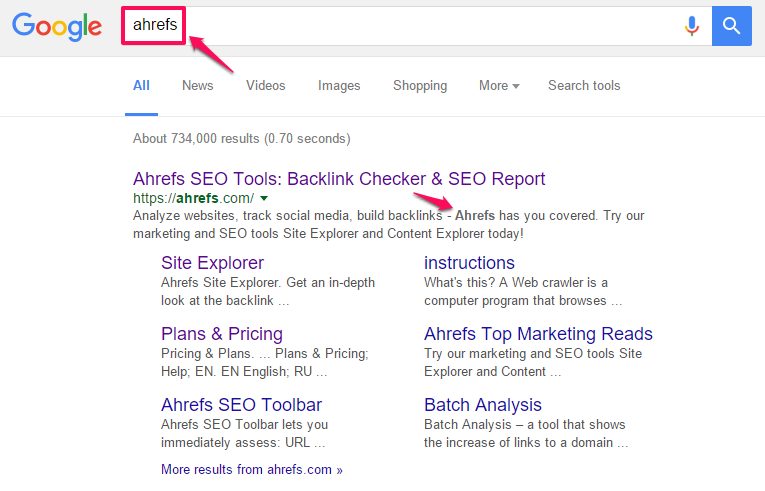
11. Use your keyword in the meta description – While not having a direct influence on ranking, keywords in meta descriptions will be bolded in search results which can help to improve CTR.
keyword highlighted in search result
12. Split test – Experiment with different meta description formats to optimise CTR.
13. Ensure each page has a unique H1 tag – Every page on your site should have a unique H1 tag.
14. Use your keyword in the H1 Tag – The H1 tag continues to be an important on-page ranking factor and should include the page’s target keyword.
15. Include secondary and LSI keywords – Additional header tags(H2, H3) are a good opportunity to target secondary key phrases and LSI (latent semantic indexing) keywords. 
16. Avoid using header tags in layout – Many templates use header tags in their layout with generic words/phrases such as ‘More Details’. These should be replaced with CSS styled divs.

The content

17. Use your keyword early – Where possible (without being forced), use your target keyword in the first paragraph of your page’s content to reinforce the topic.
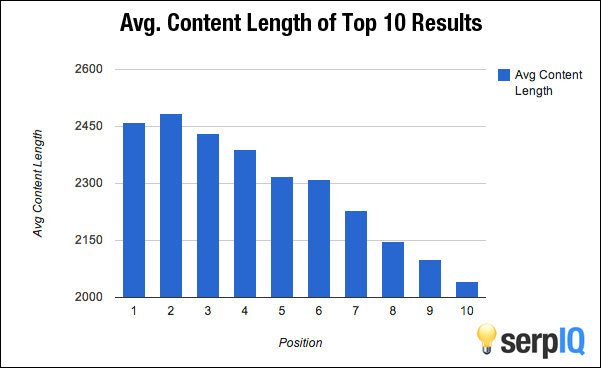
18. Long content correlates with higher rankings – Numerous studies have concluded that there is a correlation between long form content and higher rankings, although the caveat should be that this may have more to do with quality than actual length. Either way, the takeaway is to go in-depth and create the authority page for your target keyword.
Average content length of top 10 results
19. Forget keyword density – Don’t sweat keyword density. Write naturally and you will tend to use your target keyword several times within your content without having to think about it. Just make sure to include it at least once!
20. Use LSI keywords – LSI keywords are words that are semantically related to your main keyword. They are useful for cementing a page’s topic and also for differentiating homonyms(same words with different meaning, i.e. “bark” the sound a dog makes, “bark” the outer layer of a tree) in search queries. When writing about a topic you will tend to use these naturally, but it can be an idea to do some research beforehand.
21. Add multimedia – Adding multimedia to your content – images, videos , slideshows etc – makes it more engaging, shareable and linkable. There may also be some direct SEO benefit.
22. Add internal links – Adding internal links to other pages from within content allows link equity to flow round your site and also encourages reader exploration, lowering bounce rate. An often criminally under-utilised aspect of SEO. 
23. Link out – Linking out to high quality, authoritative, and topically related content aids relevance and builds relationships with other site owners in your niche. Best practice is to open external links in a new tab/window.
24. Keep content up to date – Regularly update old/archive content to keep it fresh, relevant and rankworthy. 
25. Prioritise quality over frequency – With the exception of large publications, and news sites (which require lots of daily content), most sites will get more benefit by focusing on content quality, as opposed to frequency. Publishing 1 great article a week is better than publishing 1 mediocre article daily. 
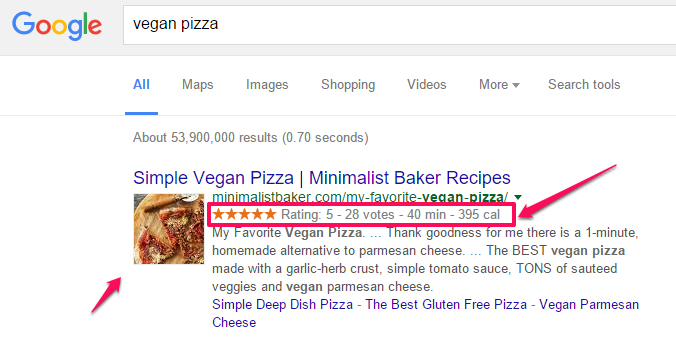
26. Set up rich snippets/structured data – Set up and test structured data to benefit from rich snippets in search results.
rich snippets
46. Include table of contents for long content – Include a table of contents with internal links to specific sections on long pages to benefit from wikipedia style ‘jump to’ links (below) in the search results.
jump to links in search results

Site Layout & Architecture

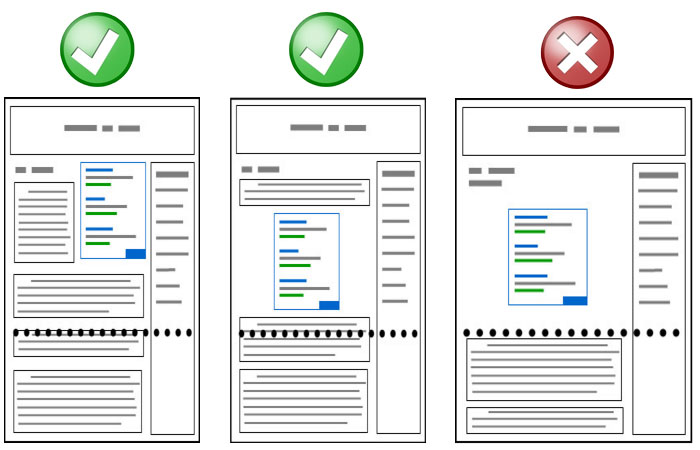
1. Ensure content is clear and upfront – Content should be front and centre on any web page. At a minimum the page’s title should be ‘above the fold’; that is visible without the visitor having to scroll.
2. Avoid too many ads above the fold – While display advertising is an essential revenue model for many websites, too many ads above the fold may impact negatively on search rankings. Ensure any display advertising is non intrusive and clearly distinguishable from content. 
avoid too many adds above the fold
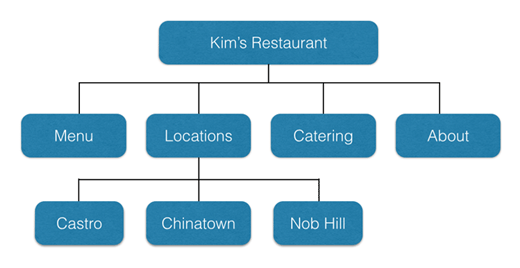
3. Create a content hierarchy – A well designed hierarchy keeps content organised and allows pagerank to flow effectively round a website, boosting key ‘hub’ pages. 
example site structure
4. Ensure navigation is clear – Navigation should be easy to locate and intuitive for both search engines and users. 
5. Nofollow any paid/affiliate links – All paid links should have the rel=”nofollow” attribute added. This includes affiliate links. 
<a href="http://www.example.com" rel="nofollow">Paid Link</a>
6. Use SEO friendly URLs – URLs should be human readable and follow a logical structure. Short URLs which include target keywords(separated by hyphens) are considered best for SEO.
7. Ensure you have clearly visible contact information – Contact details should be easy to find and ideally should include a physical address. 
8. Include privacy policy and about page – These are key pages which help with trust from both users and search engines. 
9. Minimise boiler plate text – Keep duplicated text in layouts (i.e. sidebars) to a minimum. 
10. If you are targeting local SEO include your address in layout – Add your physical address and contact details to your page layout when targeting local keywords.
11. Use www. or non www – Whichever you choose, ensure your site is only accessible and indexable by either www or non www. Best practice is to also set the preferred domain in webmaster tools.

Top SEO tips


SEO is a very volatile industry because of the many changes that take place in the Google algorithm within a period. The algorithm set in place this month may not be the same the next. It is an always evolving algorithm that encourages SEO specialists to stay on their toes and keep abreast with updates.
As 2015 is now behind us, it has become more important for specialists to look out for trends that can affect search rankings for their keywords in this new year.
Considering the changes that took place in SEO this 2015, below are trends that you as an SEO specialist must look out for to improve your site performance on search results in 2015.

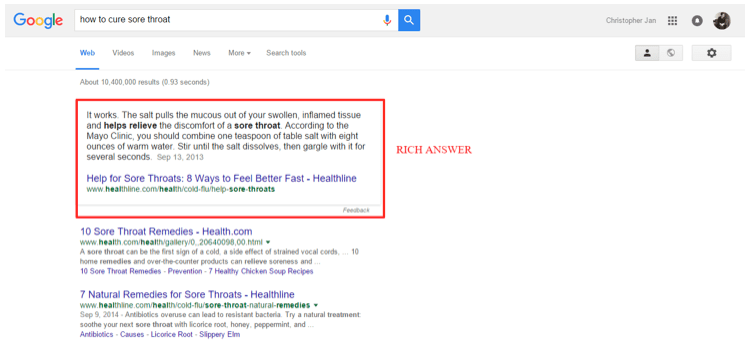
Optimize for rich answers

Forget the top spot of Google search. It is time to optimize for rich answers.
These are results that appear above the top organic search results.
Google answer box
According to Stone Temple Consulting, rich answers appear on 19.45% of Google search results out of the 850,000 keyword queries used to trigger these.
The percentage may not be as high at the moment – most of the rich answers appear on search queries for song lyrics. However, there is good cause to believe that its number will only increase in the future. Since Google has made its intention of providing value to its users clear, rich answers provide the most relevant information based on the search query.
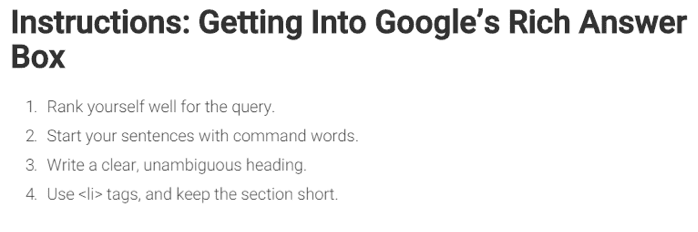
How to rank for rich answers: Northcutt Consulting Group has broken down the most relevant factors for ranking on rich answers.
Google answer box
The first point is important. Optimizing for rich answers requires you to optimizing for your target keyword as well. Getting your page to rank on the first page of search engines will increase your chances of getting into the rich answers box.
The post at Northcutt is not the definitive way to rank for the rich answer box since we are dealing with Google algorithm here, after all. Its algorithm can never be reduced to an exact science consider of how unstable it is. However, the post should give you a good idea of how you can increase your chances of getting your page on top the top of search results.

Improve user engagement

Ever since, marketers have always speculated user engagement as a possible ranking factor. This covers the average time on site, bounce rate, pogo sticking, and others.
For conversion, it is a proven factor that determines the effectiveness of page elements that contribute to the chances of visitors committing to your call to action.
However, what makes this factors difficult to measure in search engines is the lack of data supporting it.
User engagement is too indirect an influence on search rankings. Nonetheless, it is something that all website owners need to optimize if they are serious about getting more out of their SEO efforts.
“User engagement is just as important as any other on-site element in this day and age,” says Matt Banner of OnBlastBlog.com. “If a visitor enjoys your website, they'll stay on your site longer, visit more pages, help contribute to a lower bounce rate for your site overall, and most likely become a returning visitor.
“All of these positive elements factored together combine for a type of website that Google wants to rank highly in the search engines. If the user finds the website beneficial, you can bet Google will as well.”
How to rank with the help of user engagement: To help improve your site performance, in the long run, using user engagement as a factor, you may need to use tools to gain insight on how much interaction your site pages is getting from visitors.
Heatmapping quickly comes to mind when thinking of user engagement. The idea here is that the more clicks a page accumulates from its links, the more interaction it has with users.
Tools like SumoMe Heat Maps and CrazyEgg are great ways to break down the number of clicks made by users on your tracked site pages. From here, you can see which links are clicked the most and least. You can then optimize your site by improving your CTA links and buttons based on the accumulated data.
To analyze visitor engagement with your site pages, the SumoMe Content Analytics is an extremely helpful tool in looking how many of your site visitors scroll down until the very end of the page. From the data, you can also find out which part of your page where 50% of your visitors leave. Determine which elements of your site pages serve as obstacles that prevent visitors from scrolling down your page and optimize your site as you see fit.

Mobile App Optimization

The mobile market is big. So big, in fact, that Google is still figuring out how to provide mobile users with a better search experience.
The Mobilegeddon update is a step towards this direction, as site owners are encouraged to develop mobile or responsive designs to increase the site’s loading speed on mobile devices. A faster loading site means more chances to retain visitors.
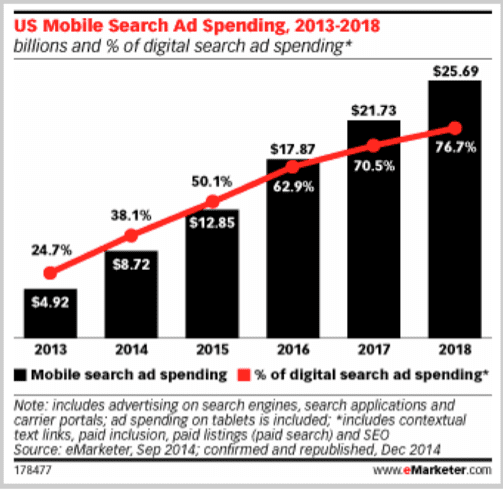
US mobile search ad spending
While there is also interest in spending on mobile ads as the figures from eMarketer show, Google will soon take a more crucial role in delivering content to mobile users, starting with app store optimization.
"ASO (App Store Optimization) will be the next gen SEO in 2016,” says Rob Lons of performance SEO services RankPay. “If you look at the rise of mobile use and how much paid ad dollars are being spent each year, you can see the huge demand and rush to reach people on their mobile devices.”
More importantly, the App Indexing is the latest development in search results that can make an impact in how your site pages will rank for your target keywords.
Originally, apps are indexed on App Store and Google Play, not on Google search. This made it much more complicated for Google to streamline its search capabilities – marketers will have to optimize on both app stores instead of just on Google organic.
Through App Index, apps are now indexed on Google search. The search ranking of apps falls under the App Pack or Deep Link category.
Below is a comparison of app rankings on mobile search. The image is taken from this extensive article about App Indexing at Search Engine Land.
App Indexing brings in millions of additional search results for search queries on Google mobile search. This means that webpages ranking for their target keyword will have to fight of million of app pages that are optimized for their keyword as well. As if the competition is not stiff enough!
How to rank for mobile search results after App Indexing: Instead of fending off app results for your target keyword, why not consider developing an app for your business?
If you do not have an app for your site yet, consider building one to take advantage of the benefits App Indexing brings, in particular, its deep links.
Choosing the best mobile app development services is just half the battle. The other half involves developing a solid foundation for your mobile app and the goal you wish to achieve in developing it. Identifying both should provide you a more strategic approach with your mobile app in line with meeting your online goals.
Once you have a mobile app in place, you can begin implementing the steps on how to get your deep app screen indexed on search results by referring to this straightforward documentation from Google. The process can be arduous for non-developers, so you may want to ask for help from an expert regarding this.

Google’s new search quality guidelines

Google released their latest 160-page search quality guidelines. The last previous published was the abridged version two years ago that was a reaction to the leaked versions from 2008, 2011, and 2012 (notwithstanding the 2014 version) for the purpose of transparency.
As expected, the published document is far from the finished product.
"This is not the final version of our rater guidelines,” says Google Senior Program Manager and Search Growth & Analysis Mimi Underwood in this post. “ The guidelines will continue to evolve as search, and how people use it, changes. We won’t be updating the public document with every change, but we will try to publish big changes to the guidelines periodically."
You can download your copy of the search quality guidelines from the link above.
Below are some key takeaways from the guidelines:
  • High-quality standards are set on Your Money or Your Life (YMYL) pages - These pages include shopping transaction pages, financial information pages, medical information pages, legal information pages, and similar sites. The reason for the placing high-quality standards on these pages is how these can affect "the future happiness, health, or wealth of users." Low-quality YMYL pages can negatively impact one's happiness and health, so it is important to build useful pages under this umbrella term.
  • The value placed on Expertise/Authoritativeness/Trustworthiness (E-A-T) –high-quality content must come from E-A-T sources. E-A-T is built by acquiring accreditation if necessary. For instance, medical information found online must come from accredited medical persons or organizations. Corollary, first-hand experience counts as a form of expertise. For example, a user sharing how he survived cancer is a form of expertise.
  • Needs Met guidelines cater to mobile usability – Web pages are gauged by how they are optimized for mobile viewing and the satisfaction they provide to users about the search query. The guidelines are loosely divided into five ratings (from Fully Meets to Fails to Meet) – a website can fall between the assigned ratings if needed be.
What to make out of these quality guidelines: All signs point to improving the mobile usability of your site (as already mentioned above), as well as establishing yourself as an influence within your niche. By building your expertise and knowledge in your industry, you can establish your authority as a subject matter expert, thus earning the trust of your audience.
You can start by launching an influencer marketing campaign to establish your online visibility. From there, you can slowly build yourself as an authority based on different factors such as your site's Domain Authority, social proof (testimonials from customers and social media shares), and blog comments, among other factors.

13 Actionable SEO Techniques You Can Use Right Now

People that succeed with SEO do two things very well:
First, they identify SEO techniques that get them results.
Second, they put 100% of their resources into executing and scaling those techniques.
But you’re probably wondering:
“How do I find SEO strategies that actually work?”
Well today I’m going to make it easy for you.
All you need to do is carve out a few minutes of your day and tackle one of the 21 white hat SEO techniques below.
1. Find Broken Link Building Opportunities on Wikipedia
Broken link building has it all…
Scalable.
White hat.
Powerful.
There’s only one problem: finding broken links is a HUGE pain.
That is, unless you know about a little-known wrinkle in Wikipedia’s editing system.
You see, when a Wikipedia editor stumbles on a dead link, they don’t delete the link right away.
Instead, they add a footnote next to the link that says “dead link”:
Wikipedia Broken Link Building
This footnote gives other editors a chance to confirm that the link is actually dead before removing it.
And that simple footnote makes finding broken links dead simple.
Here’s how:
First, use this simple search string:
site:wikipedia.org [keyword] + “dead link”
For example, if you were in the SEO space you’d search for something like this:
Google Search String
Next, visit a page in the search results that’s relevant to your site:
Google Search Results
Hit ctrl + f and search for “dead link”:
Page Search
Your browser will jump to any dead links in the references section:
Wikipedia Dead Link
Backlinko reader Danny pointed out that Wikipedia actually has a list of articles with dead links. This makes finding dead links in Wikipedia even easier.
You can also use a new tool called WikiGrabber that allows you to search for dead links on Wikipedia pages.
Wikigrabber
Once you’ve found a dead link, now what?
Well you could re-create that dead resource on your site and replace the dead link in Wikipedia with yours.
But that would only land you a single link (and a nofollow link at that).
Here’s how to get the most out of the dead links that you find:
As you may expect, a resource that get linked to from Wikipedia usually has A LOT of links from other authoritative sites.
That’s why you want to take your broken link and pop it into ahrefs (or your link analysis tool of choice):
Ahrefs Example
And you’ll get a long list of sites that you can contact about their broken link:
ahrefs_results
For example, the dead link I found on the SEO Wikipedia entry has 380 backlinks from 152 referring domains.
Backlink Results
And it took me about 30 seconds to find.
Easy, right?

2. Discover Untapped Keywords on Reddit

Reddit is a keyword research goldmine.
Where else can you find a community of millions of people discussing every topic under the sun?
And when you read these discussions you’ll often stumble on awesome keywords that you’d NEVER find in the Google Keyword Planner.
Let’s say you ran a site that sold headphones.
Head over to Reddit Search and search for “headphones”:
Reddit Search
If there’s a subreddit in that space, head over to that subreddit.
Subreddit
If not, just look at the search results that Reddit shows you for that keyword.
Keep an eye out for threads where people tend to ask a lot of questions (like an AMA or Q&A thread).
This one looks promising:
Reddit Search Results
Next, scan the thread for potential keywords. Terms that pop up again and again are perfect.
For example, I noticed this model of headphones mentioned a few times in a headphone Q&A thread:
Reddit Thread
Sure enough, the keyword “Beyerdynamic DT-770” gets 2,400 monthly searches:
Keyword Planner Results
Trust me: you could spend the rest of the month playing around with the Google Keyword Planner and you’d never find that keyword.
But I found it after about 5-minutes on Reddit.
Invest an hour or so digging for keywords on Reddit and you’ll nab enough keywords to last you through 2018.

3. Find Link Prospects on Delicious 

If you’ve been in the SEO game for a while you know that the best link opportunities come from people that have shared similar content in the past.
And the popular bookmarking site Delicious.com is one of the best places to find people that have shared content in your niche.
Here’s how:
First, head over to Delicious and search for a broad keyword related to your industry:
Delicious Search
Find content that’s similar to yours and has a lot of bookmarks:
Delicious Bookmarks
Then click on the bookmark link.
Now you’ll see all of the people that saved the link:
Delicious Shares
Next, look at one of the profiles to see if they have a website listed:
Website Link
If so, head over to their site to find their contact information:
Contact Information
Finally, reach out to them to let them know about your similar piece of content.
Outreach Pitch
Shout out to my friend Jason from Kaiser the Sage who introduced me to this technique in one of his blog posts.

4. Copy Adwords Ads to Make Killer Title and Description Tags

It’s no secret that compelling title and description tags get more clicks in the SERPS.
(In fact, REALLY good copy can actually steal traffic from the top 3 results)
But how can you possibly know what people want to click on?
That’s easy: look at that keyword’s Adwords ads.
You see, the Adwords ads that you see for competitive keywords are the result of hundreds (if not thousands) of split tests. Split tests to maximize clicks.
And you can use elements of that ad to turn your title and description tags into click magnets.
For example, let’s say you were going to publish a blog post optimized around the keyword “glass water bottles”.
First, take a look at the Adwords ads for that keyword:
Adwords Ads
Keep an eye out for interesting copy from the ads that you can work into your title and description.
In our “glass water bottles” example, we have phrases like:
  • BPA-free
  • Keep you hydrated
  • Durable
  • Reusable
Here’s how the title and description tags might look:
Example Meta Title and Description Tags
As you can see, these tags include words that areproven to generate clicks.

5. Find A+ Link Prospects on AllTop

What if there was an up-to-date list of blogs in your niche that you could use to find quality link opportunities?
I have good news. There is. And it’s called AllTop.
AllTop is a modern-day directory that curates lists of quality blogs in almost any industry under the sun.
To find blogs in your niche, just go to the AllTop homepage and search for a keyword:
AllTop Search
Next, find the categories that fit best with your site’s topic:
All Top Results
And AllTop will show you their hand-picked list of quality blogs in that category:
AllTop_Listings
Now you have a long list of some of the best blogs in your industry.
And these bloggers are the exact people that you want to start building relationships with.

6. Use Benefit-Focused Content Curation

Let’s face it:
Most content curation is pretty weak.
I think I speak for everyone when I say that I’ve read enough “top 100 posts you need to read” lists for a lifetime.
So how can you make your content curation stand out?
By tapping into Benefit-Focused Content Curation.
Benefit-Focused Content Curation is similar to most other types of curation, with one huge difference: it focuses on the outcomes that your audience wants.
I’m sure you’d like to see an example.
Here you go:
Link Building Guide
This is a guide I put together a while back called, Link Building: The Definitive Guide.
This guide has generated over 19,000 visits from social media, forums, blogs and search engines:
Landing Page Traffic
(I should point out that the guide’s design and promotion contributed to its success. But it all started with how the content itself was organized)
What makes this guide’s curation unique is that it’s organized by benefits, not topics.
For example, chapter 2 is called “How to Get Top Notch Links Using Content Marketing”:
Link Building Chapter 2
Note that the title isn’t, “Chapter 2: Content Marketing”.
And most of the other chapters follow the same benefit-driven formula.
Why is this so important?
When someone sees a list of curated links they immediately ask themselves “what’s in it for me?”.
And when you organize your content around outcomes and benefits, that answer becomes really, really obvious.
In other words, answering “WIIFM?” makes the perceived value of your content MUCH higher than a list of 100 random resources.

7. Link Out to Authority Sites

With all the talk about Hummingbirds and Penguins it’s easy to forget about an important Google algorithm update from 2003.
Despite being over 10-years old, Hilltop still plays a major role in today’s search engine landscape.
Hilltop is essentially an on-page SEO signal way that tells Google whether or not a page on the web is a “hub” of information.
How do they know which pages are hubs? Based on the quality and relevancy of the outbound links on that page.
If you think about it, this makes total sense:
The pages you link out to tend to reflect the topic of your page.
And pages that link to helpful resources also tend to be higher-quality than pages that only link to their own stuff.
(In fact, Moz’s ranking factors study found a correlation between outbound links and higher rankings)
In other words, pages that link out to awesome resources establish themselves as hubs of helpful content in the eyes of Big G.
Bottom line: Link to at least 3 quality, relevant resources in every piece of content that you publish. That will show Google that your page is a Hilltop Hub.

8. Send Juice to Pages Sitting on Page 2 or 3

I’m not sure how else to say this:
If you’re on page 2 or 3 of Google’s search resultsyou might as well be on page 58.
So how can you give those pages a boost so they hit the first page and get send you some traffic?
Use one of my all-time favorite SEO techniques – throwing some internal links their way!
Here’s the 3-step process:
Step #1: Use Google Webmaster Tools (Search Console) to find keywords where you rank on the 2nd or 3rd page.
To find them, log in to your Google Search Console account and click on Search Traffic –> Search Analytics:
Search Traffic in GWT
Make sure to check “position”. That way you’ll see the average ranking for each keyword.
google search console position
Sort the results by “avg. position”:
sorting rankings by position
Next, look for keywords with an average position of 11-30.
If you’re getting clicks from a keyword on page 2 or 3, you can be pretty sure that it’s a keyword with some decent search volume.
For example, this page from Backlinko is ranking #12 for the keyword “SEO checklist”.
Even though I’m on the second page, I still get 550 impressions per month for that keyword:
keyword in google webmaster tools
Sure enough, according to the GKP, that keyword gets 720 monthly searches with a suggested bid of almost $5.00
google keyword planner data
Step #2: Identify authoritative pages on your site.
You can easily find the pages on your site with the most juice to pass around using ahrefs.
Just enter your homepage URL into the tool and click “Get Started”:
ahrefs search
Then click on “Top Pages” in the right-hand sidebar:
top pages
That will show you the most authoritative pages on your site:
backlinko top pages
Step #3: Go to those pages and add internal links.
Finally, add internal links from those authoritative pages to the pages that needs a boost.

9. Use the Word “Because” In Your Outreach Emails

When someone sees an email pop into their inbox, two questions enter their mind:
“Who is this person?”
and
“What do they want?”
The faster you answer these questions in your outreach emails, the better your response rate will be.
But how can you do that?
It’s easy:
Use the word “because” very early in your email.
Believe it or not, the word “because” has surprisingly powerful effects on human psychology.
Research by Dr. Scott Key of Northern Illinois University tested whether people waiting in line to use a copy machine would let a stranger cut in front of them.
When the stranger asked: “Can I use the copy machine before you?”, only 61% people said “yes”.
But when the stranger asked: “Can I use the copy machine before you because I’m in a rush?”, 89% said yes
(That’s a 45% increase!)
Why such a huge difference?
It turns out that the word “because” makes a request — ANY request — seem more legitimate.
In the world of outreach, legit messages get better responses.
(Just look at all those lame guest post pitches that flood your inbox. If they actually took the time to look legit, they’d perform a lot better)
Here’s an example blogger outreach pitch that leverages the word “because” early on:
Example Outreach Emails
The person receiving that message knows why I’m emailing them after 2-seconds of reading.
But more importantly, the word “because” cements my reason for reaching out as more legit.

10. Write Mini Blog Posts for YouTube Descriptions

I don’t need to tell you that YouTube video results are dominating Google’s first page.
And considering that Google owns the popular video site, it’s a trend that’s not likely to change anytime soon.
But did you know that there’s a dead-simple technique that can get your YouTube videos to rank higher for competitive keywords in both YouTube and Google?
Well there is: write 200+ word video descriptions.
When most people upload a video to YouTube, they mindlessly toss a few words into the description box:
YouTube Video Description
That’s a HUGE mistake.
Remember that Google can’t watch or listen to your video content.
Instead, they rely on your video’s text-based title and description to determine what your video is about.
Not only does this extra text-based information help you rank better for your target keyword…
…but it also ranks your video closely related long tail keywords.
For example, check out the description for my latest YouTube video:
YouTube Description Example
That’s a high-quality, 200-word description.
Not only has this helped my video rocket to the first page of YouTube for the keyword “SEO Strategy”:
youtube search results
But it’s also pushed my video to the top of YouTube for long tail keywords, like “infographic SEO strategy”:
#1 Ranking in YouTube
If you want to learn more about YouTube SEO, check out this step-by-step guide.

11. Reverse Engineer the Results on Page 6

Fun fact:
Reverse engineering pages 2-10 will often hook you up with top-notch link opportunities…
…opportunities that you’d miss when you only reverse engineer Google’s first page.
But you’re probably wondering:
“Is there really anything good to reverse engineer on page 6?”
The short answer: yes.
As Wil Reynolds points out, the idea that pages 3-10 are littered with low-quality sites is a myth.
He says that a lot of the results on Google’s inner pages are made up of people that started cool sites…but eventually gave up when things didn’t work out the way they planned.
Here’s the thing: before they moved on to the next project, they published some awesome resources.
Because these resources tend to be neglected, you can easily improve them and steal their links using The Skyscraper Technique.
For example, I did a quick search for “weight loss tips”.
Sure enough, I found this heavily linked-to resource on the 6th page:
Page 6 Result
As you can probably see from the screenshot, this page has A LOT of room for improvement.
However, because the author of this page used to care about his site, he was able to land links to this page from sites like eHow.com:
Ehow References
Other pages on this neglected site have attracted links from Livestrong.com (DA87) and LifeHacker (DA93).
Think you could take these outdated resources and make them better?
I know you can :-)

12. Embed Long Tail Keywords In Title Tags

Here’s the deal:
If you only include one keyword in your title tag you’re leaving A LOT of search engine traffic on the table (and no, I don’t mean keyword stuffing).
Here’s what I mean:
I recently published a post called “White Hat SEO Case Study: 348% More Organic Traffic in 7 Days“.
My target keyword for that post was, “white hat SEO”. And I obviously included the keyword “white hat SEO” in the post’s title.
But I didn’t stop there.
I realized that the keyword “SEO case study” alsogot some decent traffic:
Keyword Volume
So I decided to embed that long tail keyword into the blog post title:
keyword in blog post title
Within days I was ranking #1 for “SEO case study”:
number one ranking
As you might expect, the keyword “SEO case study” is MUCH less competitive than “white hat SEO”.
Because of that, I got traffic almost instantly from the keyword “SEO case study”.
And as that page has accumulated links, it’s made its way onto the first page for “white hat SEO” as well.
first page google ranking
(But it took a few weeks to hit page 1)
If I had only optimized for “white hat SEO”, I wouldn’t have received ANY traffic until I hit the first page for that term.
Fortunately, my embedded long tail keyword “SEO case study” hooked me up with traffic right away.
Bottom line: Find long tails that you can embed into your titles.
You’ll get search engine traffic faster…and eventually rank the page for more than one term.

13. Hack Wikipedia for Keyword and Topic Ideas

Want to find untapped keywords that your competition doesn’t know about?
Then stop using the Google Keyword Planner and use this SEO technique instead.
Sure, The Keyword Planner is nice for monthly search volume and CPC information…but it’s HORRIBLE at generating new keyword ideas.
Why?
Well, the Keyword Planner only gives you VERY close variations of the keywords of your seed keywords.
So if you enter a seed keyword like “weight loss”, it will spit out keywords like:
  • Weight loss tips
  • Healthy weight loss
  • Fast weight loss
  • Weight loss diet
(You get the idea)
If you want to find keywords that are closely related to your seed keywords — but not straight-up variations — you need a human mind.
Or better yet, the thousands of human minds that contribute to Wikipedia.
Here’s how:
Head over to Wikipedia and enter a seed keyword (I’m going to use the keyword “insurance” in this example):
Wikipedia Search
Next, keep an eye out for sections on the Wikipedia entry that display closely related keywords and topics.
These sections are…
The “Contents” box:
Wikipedia Contents
Callouts and sidebars:
Wikipedia Callout
Internal links:
Internal Links
And “See Also” sections:
See Also
You’ll usually come away with fistfuls of keyword and topic ideas from a single Wikipedia entry.
If you want to find even more keyword ideas, click on an internal link.
Then simply follow the same process for that Wikipedia entry. Rinse and repeat.